










Phantom makes several networks feel like one wallet. Its usefulness still depends on network coverage, the recovery source behind each account and what a swap actually leaves you with.
A Phantom wallet review should answer more than how many tokens the app can display. Seeing several networks together is convenient; mixing up a receiving address, an account backup or the cost of a swap can be expensive. We assessed network compatibility, account controls, fee visibility and the limits that affect everyday use.
Scope: We examined official documentation, the download page and published interface examples on September 26, 2026. We did not install a funded wallet, sign transactions or run speed or security tests. The screens below are Phantom’s examples, not balances or trades from our own account.
Who is Phantom useful for?
Phantom is worth considering for someone using Solana alongside other supported networks. Bringing accounts and application connections into one interface is its main attraction. Restricted network coverage and the need to inspect swap costs remain practical drawbacks, even when the interface feels simple.
The underlying model is self-custody. Phantom is an interface for blockchain accounts, not a vault where the company holds all of your assets. Keeping access to those accounts is still your responsibility.
| Need | Assessment | Check before choosing |
|---|---|---|
| Daily activity on Solana and supported networks | Phantom’s combined account view can be useful. | Does it support the application, token and transfer network together? |
| Custom RPC or an unlisted network | Phantom may not fit. | A wallet supporting the required network and, if needed, custom networks. |
| Long-term storage | A convenient interface is not enough. | Recovery arrangements, device security and hardware compatibility. |
| Frequent swaps at low cost | Built-in convenience should not be assumed free. | The final amount for the same assets, network and time. |
A matching address format does not prove network support
The official list checked for this review includes Solana, Ethereum, Bitcoin, Base, Polygon, HyperEVM, Robinhood Chain and Arc. BSC, Arbitrum and Optimism appear among unsupported networks. Consult the current network list before sending funds.
Phantom does not let users add a custom network through an RPC URL. Nor does an identical EVM address prove support for every EVM chain. If a sender offers several USDC withdrawal networks, the token’s name alone is insufficient: match the receiving account, network and token version. Our crypto transfer checklist covers the sequence.
Older screens can mislead: Phantom announced August 26, 2026 as the end of Monad support and September 24, 2026 for Sui. A network name in an old help image is not current compatibility evidence. Losing app support does not delete assets from the blockchain.
Settings → Active networks changes which assets appear; it does not bridge them. The setting applies across the wallet rather than establishing a separate network list for each account. If a balance disappears, check the account and network first. Immediately repeating a transfer may add a second problem.
An account label is not its recovery method
Accounts group addresses across networks. Imported private keys, other recovery phrases and connected hardware wallets can have separate backups. Restoring the main account should not be assumed to restore every independently added account.
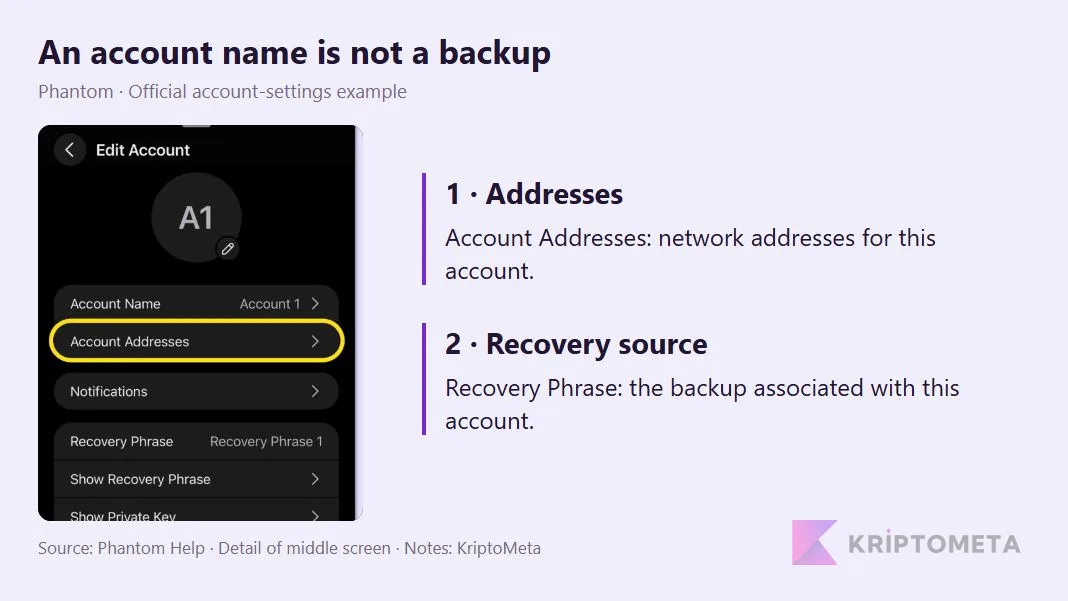
Detail from Phantom’s official account-settings example, with KriptoMeta explanations. It is not our test account. Source: wallets, accounts and addresses.
Account Addresses concerns receiving addresses; Recovery Phrase identifies the account’s recovery source. Consider naming two accounts “Daily” and “Storage.” The labels help organize activity. If both derive from the same recovery phrase, they do not provide independent protection when that phrase is exposed.
Google or Apple sign-in also differs from the device lock. A browser password or Face ID alone does not restore access on another device; if your account uses a PIN, its requirements still apply. The recovery-phrase backup guide explains the preparations that sit outside the app interface.
Compare the final amount, not just the swap fee
Phantom documents a 0.85% app fee on most swaps, with exceptions. Network costs and price impact are separate considerations. On cross-chain routes, bridge-provider fees can be included within price impact. Knowing the headline percentage does not establish the full cost.
The calculation below is hypothetical, not a live quote. Assume a $1,000 input, the same network and quote time, and an unchanged dollar value for the output asset during the comparison. Costs already reflected in the output must not be deducted again.
| Item | Quote A | Quote B |
|---|---|---|
| Input value | 1,000.00 | 1,000.00 |
| Quoted net output value | 991.50 | 995.50 |
| Network cost outside the output | 0.30 | 5.00 |
| Economic value after network cost | 991.20 | 990.50 |
For A, a 0.85% deduction alone would be $1,000 × 0.0085 = $8.50. B initially offers more, but its separately paid network cost reverses the result: A is $0.70 ahead in this example. Actual price impact, routing and gas balances can change the outcome. The table does not establish that Phantom is always cheaper.
Slippage tolerance is not a fixed charge either. It limits the price movement accepted during execution. A previously raised tolerance should not be left unchecked simply to make transactions go through. For an Ethereum network estimate, the gas fee calculator can help; it does not calculate Phantom’s app fee or the cost of an entire swap route.
Gasless does not mean costless
For eligible EVM swaps, Phantom may sponsor gas or collect it in another token. Optional smart-account delegation can remain active until removed and introduces contract risk. Enabling it for swaps does not make ordinary sends free.

Phantom’s official example separates app and network fees in the middle screen; the right-hand notice says gas will be paid from USDC. These amounts are not a current quote. Source: Phantom’s gasless explanation.
Check who pays and which balance is charged before approving. The documented removal path is Settings → Security & Privacy → Remove account delegation.
What a security warning cannot guarantee
Transaction previews and suspicious-site warnings support a review of what you are signing. They should not be assumed to stop every harmful signature or fake application. If the asset movement, recipient or permission differs from your intention, stop rather than treating the absence of a warning as approval.
For example, letting an app see an account differs from granting token spending permission. Disconnecting the website does not necessarily revoke an existing on-chain allowance. Our token approval and revocation guide explains the distinction and the relevant checks.
Compare alternatives by task
When comparing Phantom with MetaMask, start with the required network and application workflow rather than the number of token logos. Phantom’s custom-network limitation is a concrete deciding factor. We have not run a same-device speed or attack-resistance comparison of the two products.
A hardware wallet answers a different question: where the signing key resides. Phantom supports selected Ledger devices; check the model and mobile/extension connection separately. The current official list excludes Trezor and Tangem. Keeping keys on hardware does not prevent a user from approving the wrong destination.
KriptoMeta’s assessment: Phantom is a reasonable candidate for daily activity on supported networks. Treating it as a universal chain interface, a free swap service or a provider that handles recovery on your behalf would miss its limits. Its convenience becomes useful when network compatibility, recovery and the final quote are understood. For needs beyond Solana, compare five wallets for Web3 and portfolio use against the same criteria.