








Compare five familiar wallets by the tasks they actually support. Network limits, recovery choices and a worked cost example help narrow the shortlist beyond brand recognition.
The best crypto wallets are the ones that support the job you actually need to do. Connecting to a Solana app, managing assets on a phone and keeping long-term holdings behind a separate signing device are different jobs. A popular product can still be the wrong choice if the network, recovery method or connection you need is missing.
We compared MetaMask, Phantom, Trust Wallet, Exodus and SafePal using the same questions about Web3 access, network compatibility, recovery and total transaction costs. The aim is to narrow your shortlist, not persuade you to install five apps or treat a brand name as protection against losses.
How we evaluated the five wallets
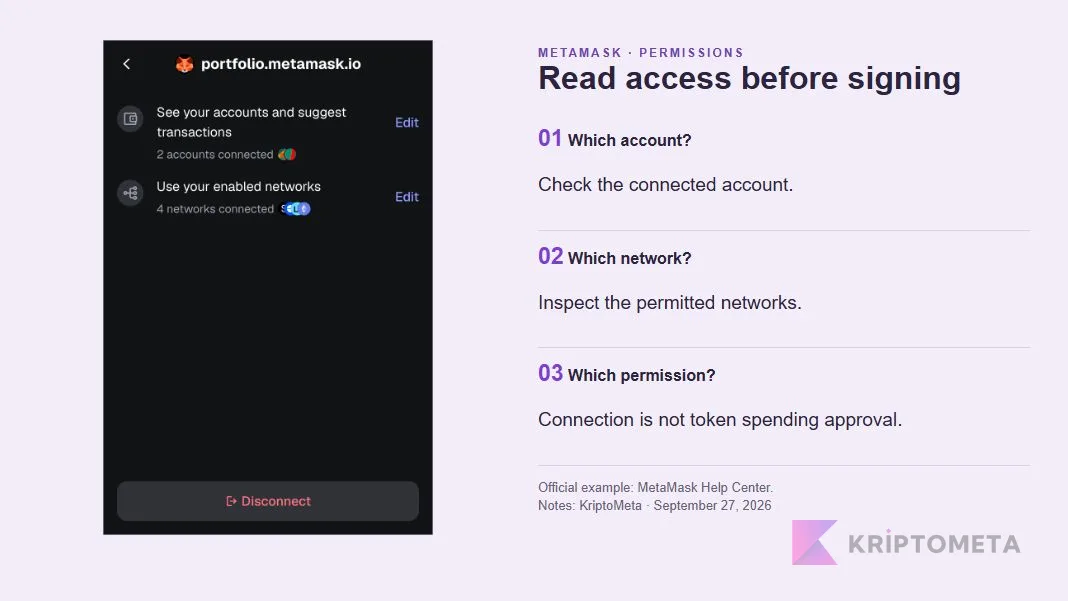
Checked on September 27, 2026. Our assessment draws on our individual reviews, current official documentation and interface examples published by the providers. We did not conduct funded transactions, hardware laboratory tests or an independent security audit. The cover is a conceptual illustration; the permissions screenshot below is attributed to its provider.
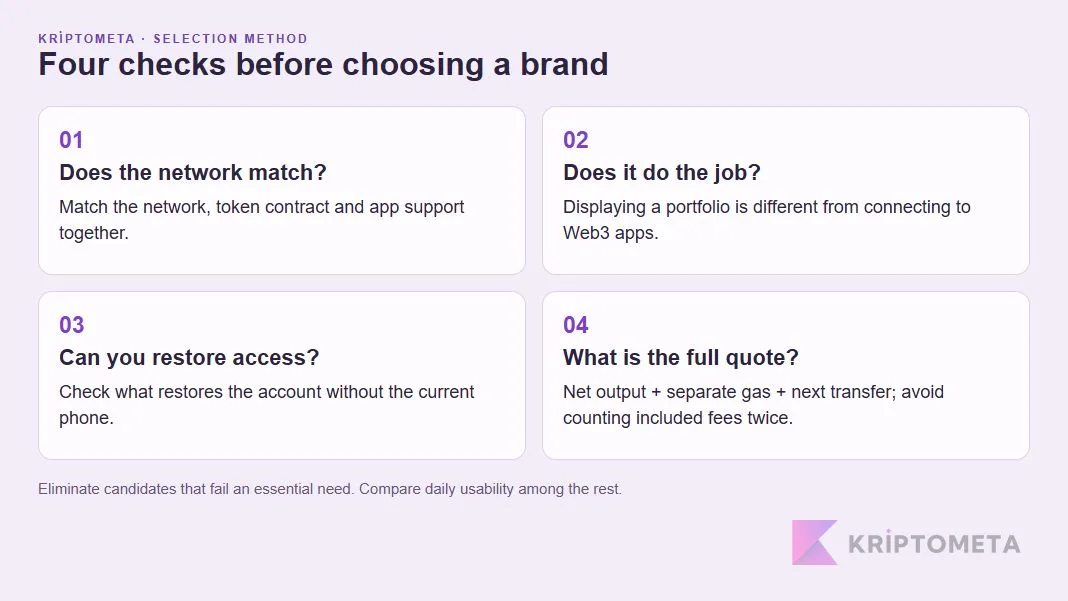
List order is not a security ranking. Each candidate faces the same questions: does it support the intended network and app? Where does signing happen? What restores access after a lost phone? Which costs sit outside the displayed quote? What happens when a supported feature is retired? We prioritised restrictions that can change the decision rather than adding features together to manufacture a score.
A self-custody crypto wallet and an integrated purchase, swap or exchange service are not the same provider relationship. Downloading an app does not establish eligibility for every service inside it. US readers should check the relevant provider’s country and state restrictions, identity requirements and supported payment methods separately.
Which crypto wallet fits which use case?
| Wallet | Reason to shortlist | Decision-changing limitation |
|---|---|---|
| MetaMask | Managing app, account and network permissions separately | Connection permissions and token spending approvals are different controls. |
| Phantom | Solana apps and supported additional networks | Not every EVM network is supported; do not assume BNB Smart Chain compatibility. |
| Trust Wallet | Mobile use and flexible gas payment for eligible transactions | Mobile, extension and integrated services have different scopes. |
| Exodus | Managing supported assets on mobile and desktop | Mobile Web3 connections have been removed; unsuitable for that active dApp requirement. |
| SafePal | Choosing between software accounts and separate hardware signing | Installing the app does not turn an existing software key into cold storage. |
If you arrived looking for the best Web3 wallets, distinguish displaying a portfolio from connecting it to an application. Seeing an asset balance does not prove that every protocol on its network is supported. Exodus demonstrates why an older recommendation list needs a fresh feature check.
MetaMask: a candidate for readers who track app permissions
For Ethereum and EVM app users, a useful criterion is whether connected accounts and networks can be inspected and changed. MetaMask’s permissions documentation shows separate controls for those selections. Being able to narrow access after connecting is more meaningful than merely seeing a successful connection message.
Strength: visibility into the scope of an app connection. Trade-off: the user still needs to understand signatures and spending approvals. Disconnecting an app should not be confused with revoking every permission previously written to the blockchain. We shortlist MetaMask for regular app use; extra connection options are not automatically an advantage for someone who only wants to monitor holdings.
Our MetaMask review examines accounts, networks, recovery and fees in more detail. At the point of signing, the site address, selected account and requested action deserve attention together.
Phantom: a strong Solana shortlist with a defined network boundary
Phantom is a relevant candidate when Solana apps are the intended destination. Multi-chain does not mean every chain, however. Its official network list includes Solana, Ethereum, Bitcoin, Base and Polygon, while identifying BNB Smart Chain, Arbitrum and Optimism as unsupported.
Strength: managing supported networks and app activity within the same product family. Trade-off: an unsupported network can rule it out before interface preferences matter. A familiar token name or logo is not enough to justify sending its BNB Smart Chain version. The exact network must match, even when a token exists elsewhere under the same ticker.
The Phantom wallet review covers recovery and quote details. Our reason for considering it here is Solana-oriented use, not a claim that it can replace every other wallet.
Trust Wallet: mobile convenience requires a version-specific assessment
Readers handling everyday transactions on a phone can assess Trust Wallet against their mobile workflow and network needs. FlexGas allows eligible gas payments using supported tokens. The convenience concerns the payment asset; it does not make the underlying network cost disappear.
Strength: eligible transactions can reduce the need to maintain a separate native-token balance. Trade-off: the feature does not apply to every network, token or action. “Pay gas using a stablecoin” should not become “send anything anywhere for free.” The current confirmation screen is the place to check the actual charge.
Incident history belongs in a trust assessment too. The company’s v2.68 extension incident report describes an affected extension version and usage window in December 2025; it excludes the mobile app from that incident’s scope. Precise scope neither erases the event nor justifies labelling unrelated versions as affected. Our Trust Wallet review separates mobile, extension and third-party service risks.
Exodus: a portfolio candidate rather than a current Web3 recommendation
Exodus remains in the comparison because some readers want to manage assets without connecting to dApps. Its mobile and desktop products are candidates for supported-asset management. A comparison should make that different need visible rather than silently equating all wallets with active DeFi use.
Strength: readers focused on portfolio management can assess more than one platform. Trade-off: WalletConnect and the dApp browser have been removed from mobile, and extension support is scheduled to end on October 1, 2026. Someone seeking frequent Web3 connections should not follow an outdated Exodus recommendation.
Our Exodus wallet review explains the support change, access options and total costs. The future of a particular interface and access to assets recorded on-chain are separate questions.
SafePal: choose the signing arrangement before the brand
SafePal requires an early distinction: a software wallet account or an account used with a separate hardware device? Its official setup examples show different routes. A shared brand and app do not establish that all accounts sign in the same environment.
Strength: software and hardware routes can be evaluated against separate needs. Trade-off: the product family can confuse a beginner into equating app installation with cold storage. Anyone considering hardware should verify the device, network and transaction compatibility, rather than choosing from the brand name alone.
The SafePal review separates account type, signing and swap-provider responsibilities. Buying a device cannot retroactively give an old software key an offline history; how the account was created remains part of the decision.
Eliminate the wrong candidates with three practical scenarios
You use Solana apps but also hold a token on BNB Smart Chain
A suitable Solana interface might not meet the second network requirement. Shortlisting Phantom for Solana while checking separate BNB Smart Chain support is more useful than asking which wallet ranks first overall. If you use two apps, track the address and network of each account. Different logos do not prove that the keys behind them are independent.
You transact on mobile and sometimes lack the native gas token
Trust Wallet’s FlexGas and Phantom’s eligible gasless EVM swaps offer convenience within different boundaries. Phantom documents that workflow for swaps, not ordinary sends. Ask what the final quote shows for your particular asset, network and action rather than treating “gasless” as a universal promise.
You want to separate long-term holdings from daily app activity
An address used for games, swaps and unfamiliar protocols has a different job from a savings address. SafePal’s hardware route is a candidate for someone seeking a separate signing device; Exodus can be considered for portfolio access; active dApp connections are a further requirement. If the custody arrangement is still undecided, our guide to choosing a crypto wallet starts with keys and backups before product names.
The lowest advertised fee may not mean the cheapest wallet
A free download does not make transactions free. Swap quotes can reflect spreads and provider charges, with network costs payable separately. Moving across chains may add bridge costs. SafePal’s May 26, 2025 fee document distinguishes a 0.2% platform fee from gas and third-party costs. Check the current final quote before making a decision.
The following is a hypothetical comparison, not a tariff attributed to any brand. Assume both routes spend 200 USDC on the same network at the same time, and value USDT at $1 solely to simplify the arithmetic. The displayed output is already net of service charges; gas is paid separately.
| Item | Route A | Route B |
|---|---|---|
| Input | 200 USDC | 200 USDC |
| Quoted net output | 198.60 USDT | 199.00 USDT |
| Separately paid gas | $0.30 | $1.20 |
| Total economic cost | $200 − $198.60 + $0.30 = $1.70 | $200 − $199.00 + $1.20 = $2.20 |
Route B displays 0.40 USDT more output but costs $0.50 more after the separate network charge. A valid comparison holds the network, output token contract, time and input amount constant. Do not add a service fee twice if it is already reflected in the quote. If another transfer is needed afterwards, account for its cost as well.
Our gas fee calculator can help explain Ethereum network costs. It does not measure a provider’s spread or supply the complete swap cost in the table.
What evidence matters when choosing a trustworthy crypto wallet?
Store ratings, download counts and years in business do not establish safety on their own. Software distribution, the quality of incident disclosures, understandable recovery and readable signing requests provide more concrete assessment points. A vendor statement should not be presented as an independent audit; when an audit exists, its date and scope matter.
- Recovery: know what restores access without the current phone. An app password and recovery credentials serve different purposes.
- Signing: distinguish connecting an account, approving token spending and transferring an asset. Convenience is not a reason to accept an unreadable request.
- Distribution: follow the verified provider’s site to its store listing. A similar name in a search advertisement is insufficient evidence.
- Separation: importing the same recovery phrase into five apps does not create five independent vaults. It creates more environments in which the same key is exposed.
KriptoMeta’s assessment: use network and connection requirements for the first cut. Then decide whether you can manage recovery, understand signing requests and compare quotes on equivalent terms. There is no universal winner among these familiar names. A powerful feature that does not serve your intended use is not an advantage for you.