









Trust Wallet brings several networks into one app. We assess whether its fee previews, recovery options and security history fit the way you plan to use a wallet.
Trust Wallet brings assets on several blockchain networks into a phone-based interface. The harder question is whether its convenience matches the way you intend to use it. Receiving tokens, swapping them and depositing into a yield product can appear close together on screen while carrying very different costs and obligations.
Our assessment focuses on network compatibility, recovery, the amount left after fees and the product's security history. We checked official documentation and published interface examples on September 27, 2026. We did not install a wallet, execute funded transactions or perform a security audit. The screenshots are the manufacturer's examples, not our balances or live quotes.
Who is Trust Wallet suited to?
Trust Wallet is worth considering if you want access to several networks from your phone and are prepared to manage your own recovery arrangements. It is a less comfortable fit if you expect customer support to restore access as though the wallet were an ordinary online account.
| Your task | Potential benefit | Check first |
|---|---|---|
| Hold assets on several networks | View accounts in one application | The exact asset network and recipient's accepted version |
| Swap inside the wallet | Get a quote without moving to a separate interface | Final receipt, separate gas, route and slippage |
| Keep access when replacing a phone | Recovery options suited to the account model | Traditional phrase backup versus a SWIFT passkey |
| Leave savings untouched for a long period | Check balances and transact when needed | Whether an online signing device is necessary for that account |
An everyday transaction wallet and a long-term holding account need not serve the same purpose. Connecting the address that holds all your savings to every new app increases the consequences of a bad signature. Our wallet comparison for mobile use, Web3 access and recovery separates those needs when choosing between products.
The token ticker does not identify the network
A unified portfolio screen does not automatically move funds between blockchains. USDT on BNB Smart Chain and USDT on Ethereum share a ticker but exist on different networks. If the recipient accepts only Ethereum deposits, choosing BNB Smart Chain because its transfer looks cheaper does not solve the problem.
Start with the receiving service's deposit instructions. Match the asset and network in Trust Wallet, obtain the address from the recipient's verified screen, then check the fee and amount arriving before confirmation. A matching 0x address format is not proof that both sides are using the same network. Our crypto transfer guide covers the full sequence, including cases that need a memo.
Adding a token contract to the asset list does not bridge the asset or endorse the project. An unfamiliar token can display an impressive balance without having a reliable market in which you can sell it. Compare its contract address with a verified project source before treating the displayed valuation as usable money.
Start the fee comparison with what you receive
Downloading the application and executing an on-chain transaction are different activities. A swap can involve routing, price impact, app or provider charges and a network fee. A discount headline cannot tell you the total on its own.
Trust Wallet's selected staked and wrapped asset promotion, for example, removes the app's swap fee for eligible same-chain pairs. Network charges and third-party conditions remain separate. It does not cover every pair or cross-chain route, and the promotion is not offered in the UK.
A worked example: the better quote can have the worse net result
These figures are hypothetical, not a Trust Wallet fee schedule. Both routes spend 500 USDC on the same network at the same moment. The output token is valued against a fixed USD reference, and neither route requires an extra approval, bridge payment or other charge.
| Item | Route A | Route B |
|---|---|---|
| USD value of quoted tokens received | $497.50 | $498.20 |
| Network fee paid outside the quote | $0.40 | $1.60 |
| Economic value after the separate fee | $497.10 | $496.60 |
Route B initially offers $0.70 more, yet Route A finishes $0.50 ahead after the separate network cost. Do not subtract an app fee twice if it is already reflected in the amount received. For a real comparison, add any necessary approval or bridge transaction and consider price movement while the quote is open. The USD valuation here is an assumption, not a claim that USDC is a dollar bank deposit.
Slippage tolerance serves a different purpose: it limits the price change you accept rather than specifying a fixed commission. If a swap fails, inspect gas availability, liquidity and token restrictions before increasing tolerance. Our Ethereum gas calculator can help assess network cost; it does not calculate a wallet's app fee or the route's final output.
FlexGas and sponsored gas solve different problems
FlexGas offers alternative payment tokens for eligible network fees. The official walkthrough shows the choice under Network fee. The required token balance must be at the sending address; support does not extend to every token or action on every network.
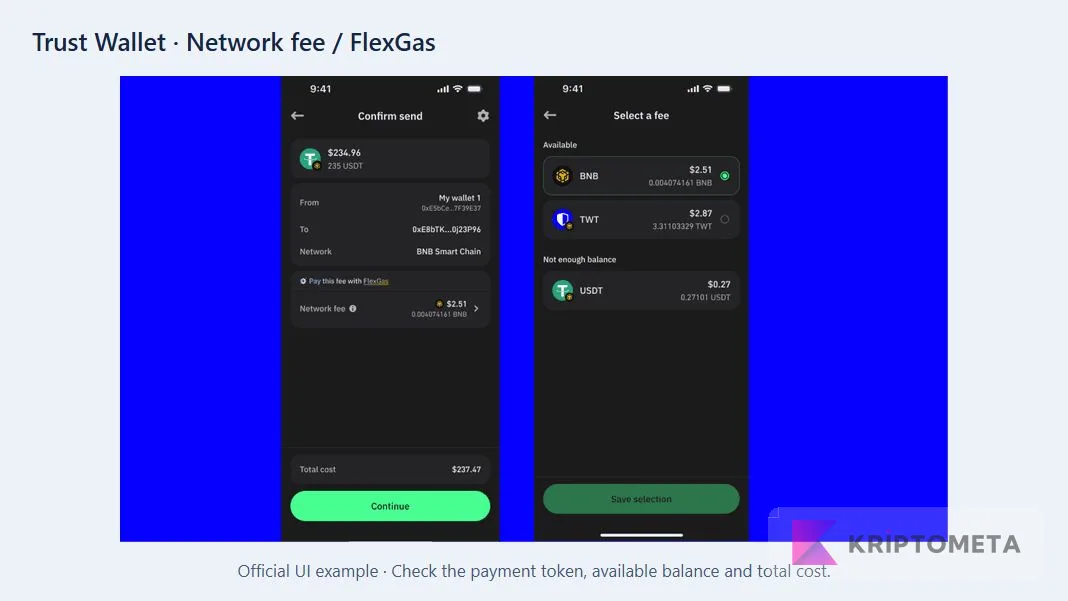
- Match the sending asset, network and destination.
- Open Network fee and identify the balance that would pay it.
- Read availability and total cost, not just the displayed dollar figure.
- Check which balance will fall in addition to the amount being sent.
Gas Sponsorship instead covers gas for qualifying swaps. Its announcement sets conditions such as a zero native-token balance, daily limits and different minimum amounts for Ethereum and Solana. Do not assume it covers ordinary sends. If the preview does not show sponsorship, prepare for the actual charge rather than relying on the feature's name.
Plan recovery around the account you actually created
A traditional Trust Wallet recovery phrase and your phone's PIN have different jobs. A PIN or biometric check controls local access; the recovery method determines how the account can be restored when the device is gone. Support cannot simply issue a replacement password that restores control of on-chain funds.
SWIFT is a separate smart-contract wallet option. Its passkey-based recovery should not be treated as equivalent to a traditional phrase backup, and its network coverage should not be assumed to match the main wallet. The official passkey documentation ties recovery access to the relevant Apple or Google account.
Before replacing a phone, identify which account needs restoring and what proves access to it. For a traditional account, check the legibility and order of the backup words. For SWIFT, check access to the relevant passkey and account that holds it. Resolve those questions while the original device still works. Our recovery phrase storage guide covers a practical backup plan for phrase-based accounts.
Read security warnings alongside the product's history
Trust Wallet's address poisoning protection can show lookalike-address warnings on supported networks. The official screen below makes the weakness of checking only the first and last characters easy to see.
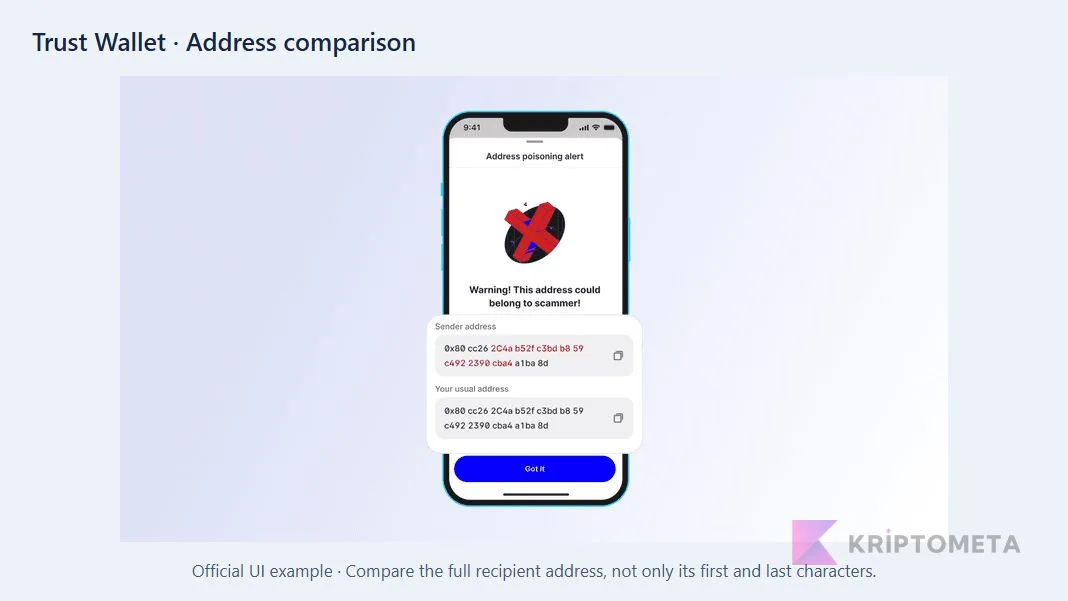
Use the recipient's current, independently verified address instead of copying an entry from transaction history. Disconnecting a website does not necessarily cancel the spending authority already granted to its contract. Review unused permissions separately using our token approval and revocation guide.
Why the December 2025 extension incident belongs in a review
The official v2.68 incident report concerns browser-extension use during December 24–26, 2025. It does not establish that mobile-only wallets were compromised. Conversely, opening an affected wallet on mobile afterward does not remove the risk from exposed keys. The report directs affected users toward a new wallet, not merely a software update.
For anyone affected, current official incident instructions take precedence over a historical version number. Our editorial lesson is broader: backup arrangements, software distribution and the signing environment must be assessed together. A scanner badge cannot promise that future transactions will be safe.
Strengths, limitations and useful alternatives
The useful part: several networks and transaction options share one mobile interface. The published screens demonstrate tangible aids such as changing the fee token and comparing suspicious addresses. For someone who would otherwise juggle applications to manage those networks, that consolidation may reduce routine effort.
The trade-off: one interface does not create one set of terms. Swaps, card purchases and yield products may involve different providers and eligibility rules. For US readers in particular, the Stablecoin Earn page explicitly excludes the US and UK. It also identifies third-party protocol and smart-contract risks. Treating the wallet's general availability as access to every service would be a mistake.
Compare alternatives by the task you need to perform. Our MetaMask review examines network and app permissions; the Phantom review looks at network boundaries and the recovery source behind different accounts. Neither is a substitute for checking the exact network and device you intend to use, and we are not claiming a tested speed or security advantage for either product.
Our decision rests on responsibility as much as convenience: Trust Wallet's broad access is most useful when you can explain your own network, recovery and transaction checks. A large supported-asset count cannot answer those questions. Before making it your everyday wallet, make sure you know how access would be restored and what the final approval will actually cost.